 4806c7f01d
Reworked the documentation and examples for the compute graph. |
4 years ago | |
|---|---|---|
| .. | ||
| docassets | 4 years ago | |
| CMakeLists.txt | 4 years ago | |
| README.md | 4 years ago | |
| appnodes.py | 4 years ago | |
| custom.py | 4 years ago | |
| graph.py | 4 years ago | |
| input_example3.txt | 4 years ago | |
| main.py | 4 years ago | |
| output_example3.txt | 4 years ago | |
| sched.py | 4 years ago | |
| test.dot | 4 years ago | |
| test.pdf | 4 years ago | |
README.md
Example 4
It is exactly the same example as example 3 but the code generation is generating Python code instead of C++.

The Python code is generated with:
sched.pythoncode(".",config=conf)
and it will generate a sched.py file.
A file custom.py and appnodes.py are also required.
The example can be run with:
python main.py
Do not confuse graph.py, which is used to describe the graph, with the other Python files that are used to execute the graph.
custom.py
import numpy as np

HANN=np.array([0.,... ])
An array HANN is defined for the Hann window.
appnodes.py
This file is defining the new nodes which were used in graph.py.
In appnodes.py we including new kind of nodes for simulation purpose:
from cmsisdsp.cg.scheduler import *
The CFFT is very similar to the C++ version of example 3. But there is no prepareForRunning. Dynamic / asynchronous mode is not implemented for Python.
class CFFT(GenericNode):
    def __init__(self,inputSize,outSize,fifoin,fifoout):
        GenericNode.__init__(self,inputSize,outSize,fifoin,fifoout)
        self._cfftf32=dsp.arm_cfft_instance_f32()
        status=dsp.arm_cfft_init_f32(self._cfftf32,inputSize>>1)

    def run(self):
        a=self.getReadBuffer()
        b=self.getWriteBuffer()
        # Copy arrays (not just assign references)
        b[:]=a[:]
        dsp.arm_cfft_f32(self._cfftf32,b,0,1)
        return(0)
The line b[:] = a[:] is like the memcpy of the C++ version.
It is important when using Numpy to do something like:
b[:] = ...
Because we want to write into the write buffer.
If we were writing:
b=a
# OR
b=a.copy()
we would just be assigning a new reference to variable b and discard the previous b buffer. It would not work. When writing new nodes, it must be kept in mind.
In this example we also want to display the output with matplotlib.
The Python FileSink is taking another argument : the matplotlib buffer. So, it is a little bit different from the C++ version since we also need to pass this new argument to the node.
So, in graph.py we have:
sink=FileSink("sink",AUDIO_INTERRUPT_LENGTH)
sink.addLiteralArg("output_example3.txt")
sink.addVariableArg("dispbuf")
Then, in the configuration object we define an argument for the scheduling function:
conf=Configuration()
conf.pyOptionalArgs="dispbuf"
And, in our main.py we pass a buffer to the scheduling function:
DISPBUF = np.zeros(16000)

nb,error = s.scheduler(DISPBUF)
The example can be run with:
python main.py
Expected outputs
Generate graphviz and code
Schedule length = 25
Memory usage 11264 bytes
And when executed:
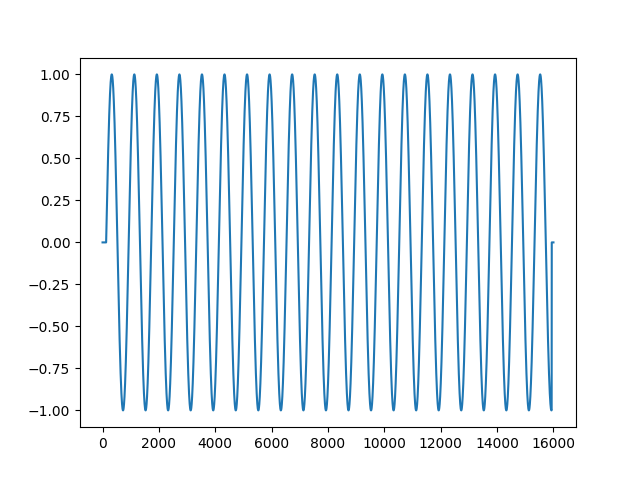
As you can see at the beginning, there is a small delay during which the output signal is zero.