 dfb67ee993
|
3 years ago | |
|---|---|---|
| .. | ||
| cg | 3 years ago | |
| documentation | 3 years ago | |
| examples | 3 years ago | |
| .gitignore | 4 years ago | |
| CycloStatic.md | 3 years ago | |
| Dynamic.md | 3 years ago | |
| FAQ.md | 4 years ago | |
| MATHS.md | 3 years ago | |
| README.md | 3 years ago | |
| cg.scvd | 4 years ago | |
README.md
Compute Graph for streaming with CMSIS-DSP
Introduction
Embedded systems are often used to implement streaming solutions : the software is processing and / or generating stream of samples. The software is made of components that have no concept of streams : they are working with buffers. As a consequence, implementing a streaming solution is forcing the developer to think about scheduling questions, FIFO sizing etc ...
The CMSIS-DSP compute graph is a low overhead solution to this problem : it makes it easier to build streaming solutions by connecting components and computing a scheduling at build time. The use of C++ template also enables the compiler to have more information about the components for better code generation.
A dataflow graph is a representation of how compute blocks are connected to implement a streaming processing.
Here is an example with 3 nodes:
- A source
- A filter
- A sink
Each node is producing and consuming some amount of samples. For instance, the source node is producing 5 samples each time it is run. The filter node is consuming 7 samples each time it is run.
The FIFOs lengths are represented on each edge of the graph : 11 samples for the leftmost FIFO and 5 for the other one.
In blue, the amount of samples generated or consumed by a node each time it is called.

When the processing is applied to a stream of samples then the problem to solve is :
how the blocks must be scheduled and the FIFOs connecting the block dimensioned
The general problem can be very difficult. But, if some constraints are applied to the graph then some algorithms can compute a static schedule at build time.
When the following constraints are satisfied we say we have a Synchronous / Static Dataflow Graph:
- Static graph : graph topology is not changing
- Each node is always consuming and producing the same number of samples (static flow)
The CMSIS-DSP Compute Graph Tools are a set of Python scripts and C++ classes with following features:
- A compute graph and its static flow can be described in Python
- The Python script will compute a static schedule and the FIFOs size
- A static schedule is:
- A periodic sequence of functions calls
- A periodic execution where the FIFOs remain bounded
- A periodic execution with no deadlock : when a node is run there is enough data available to run it
- The Python script will generate a Graphviz representation of the graph
- The Python script will generate a C++ implementation of the static schedule
- The Python script can also generate a Python implementation of the static schedule (for use with the CMSIS-DSP Python wrapper)
There is no FIFO underflow or overflow due to the scheduling. If there are not enough cycles to run the processing, the real-time will be broken and the solution won't work But this problem is independent from the scheduling itself.
Why it is useful
Without any scheduling tool for a dataflow graph, there is a problem of modularity : a change on a node may impact other nodes in the graph. For instance, if the number of samples consumed by a node is changed:
- You may need to change how many samples are produced by the predecessor blocks in the graph (assuming it is possible)
- You may need to change how many times the predecessor blocks must run
- You may have to change the FIFOs sizes
With the CMSIS-DSP Compute Graph (CG) Tools you don't have to think about those details while you are still experimenting with your data processing pipeline. It makes it easier to experiment, add or remove blocks, change their parameters.
The tools will generate a schedule and the FIFOs. Even if you don't use this at the end for a final implementation, the information could be useful : is the schedule too long ? Are the FIFOs too big ? Is there too much latency between the sources and the sinks ?
Let's look at an (artificial) example:
Without a tool, the user would probably try to modify the number of samples so that the number of sample produced is equal to the number of samples consumed. With the CG Tools we know that such a graph can be scheduled and that the FIFO sizes need to be 11 and 5.
The periodic schedule generated for this graph has a length of 19. It is big for such a small graph and it is because, indeed 5 and 7 are not very well chosen values. But, it is working even with those values.
The schedule is (the size of the FIFOs after the execution of the node displayed in the brackets):
source [ 5   0]
source [10   0]
filter [ 3   5]
sink   [ 3   0]
source [ 8   0]
filter [ 1   5]
sink   [ 1   0]
source [ 6   0]
source [11   0]
filter [ 4   5]
sink   [ 4   0]
source [ 9   0]
filter [ 2   5]
sink   [ 2   0]
source [ 7   0]
filter [ 0   5]
sink   [ 0   0]
At the end, both FIFOs are empty so the schedule can be run again : it is periodic !
The compute graph is focusing on the synchronous / static case but some extensions have been introduced for more flexibility:
- A cyclo-static scheduling (nearly static)
- A dynamic/asynchronous mode
Here is a summary of the different configuration supported by the compute graph. The cyclo-static scheduling is part of the static flow mode.
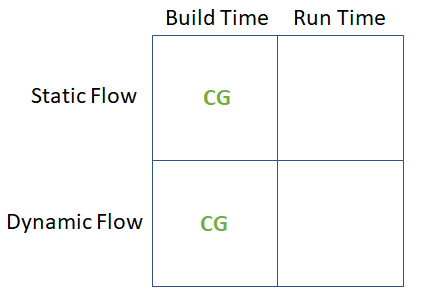
More details about the maths behind the code generator are available in a separate document.
How to use the static scheduler generator
First, you must install the CMSIS-DSP PythonWrapper:
pip install cmsisdsp
The functions and classes inside the cmsisdsp wrapper can be used to describe and generate the schedule.
To start, you can create a graph.py file and include :
from cmsisdsp.cg.scheduler import *
In this file, you can describe new type of blocks that you need in the compute graph if they are not provided by the python package by default.
Finally, you can execute graph.py to generate the C++ files.
The generated files need to include the ComputeGraph/cg/src/GenericNodes.h and the nodes used in the graph and which can be found in cg/nodes/cpp. Those headers are part of the CMSIS-DSP Pack. They are optional so you'll need to select the compute graph extension in the pack.
If you have declared new nodes in graph.py then you'll need to provide an implementation.
More details and explanations can be found in the documentation for the examples. The first example is a deep dive giving all the details about the Python and C++ sides of the tool:
- Example 1 : how to describe a simple graph
- Example 2 : More complex example with delay and CMSIS-DSP
- Example 3 : Working example with CMSIS-DSP and FFT
- Example 4 : Same as example 3 but with the CMSIS-DSP Python wrapper
- Example 10 : The asynchronous mode
Examples 5 and 6 are showing how to use the CMSIS-DSP MFCC with a synchronous data flow.
Example 7 is communicating with OpenModelica. The Modelica model (PythonTest) in the example is implementing a Larsen effect.
Example 8 is showing how to define a new custom datatype for the IOs of the nodes. Example 8 is also demonstrating a new feature where an IO can be connected up to 3 inputs and the static scheduler will automatically generate duplicate nodes.
Frequently asked questions:
There is a FAQ document.
Options
There is a document describing the list of available options
How to build the examples
There is a document explaining how to build the examples.
Limitations
- CMSIS-DSP integration must be improved to make it easier
- The code is requiring a lot more comments and cleaning
- A C version of the code generator is missing
- The code generation could provide more flexibility for memory allocation with a choice between:
- Global
- Stack
- Heap
Default nodes
Here is a list of the nodes supported by default. More can be easily added:
- Unary:
- Unary function with header
void function(T* src, T* dst, int nbSamples)
- Unary function with header
- Binary:
- Binary function with header
void function(T* srcA, T* srcB, T* dst, int nbSamples)
- Binary function with header
- CMSIS-DSP function:
- It will detect if it is an unary or binary function.
- The name must not contain the prefix
armnor the the type suffix - For instance, use
Dsp("mult",CType(F32),NBSAMPLES)to usearm_mult_f32 - Other CMSIS-DSP function (with an instance variable) are requiring the creation of a Node if it is not already provided
- CFFT / ICFFT : Use of CMSIS-DSP CFFT. Currently only F32, F16 and Q15
- Zip / Unzip : To zip / unzip streams
- ToComplex : Map a real stream onto a complex stream
- ToReal : Extract real part of a complex stream
- FileSource and FileSink : Read/write float to/from a file (Host only)
- NullSink : Do nothing. Useful for debug
- InterleavedStereoToMono : Interleaved stereo converted to mono with scaling to avoid saturation of the addition
- Python only nodes:
- WavSink and WavSource to use wav files for testing
- VHTSDF : To communicate with OpenModelica using VHTModelica blocks