|
|
# Nuttx SPI Flash demo
|
|
|
|
|
|
---
|
|
|
|
|
|
## 1、简介
|
|
|
|
|
|
通过 `apps/examples/easylogger/elog_main.c` 的 `test_elog()` 方法来测试日志的输出,默认开启了异步输出模式,用户可以接入终端来控制日志的输出与过滤器的设置。
|
|
|
`test_env()` 方法来演示环境变量的读取及修改功能,每次系统启动并且初始化EasyFlash成功后会调用该方法。
|
|
|
|
|
|
- 平台环境:NuttX-12.0.0(NuttX-10.X.X需要修改Makefile里的include的配置方法)
|
|
|
- 硬件环境:STM32F103(Nuttx的apps层无视硬件平台)
|
|
|
- Flash环境:W25QXX(Nuttx支持的SPI Flash,请查阅`nuttx/drivers/mtd`的配置文件)
|
|
|
|
|
|
## 2、使用方法
|
|
|
|
|
|
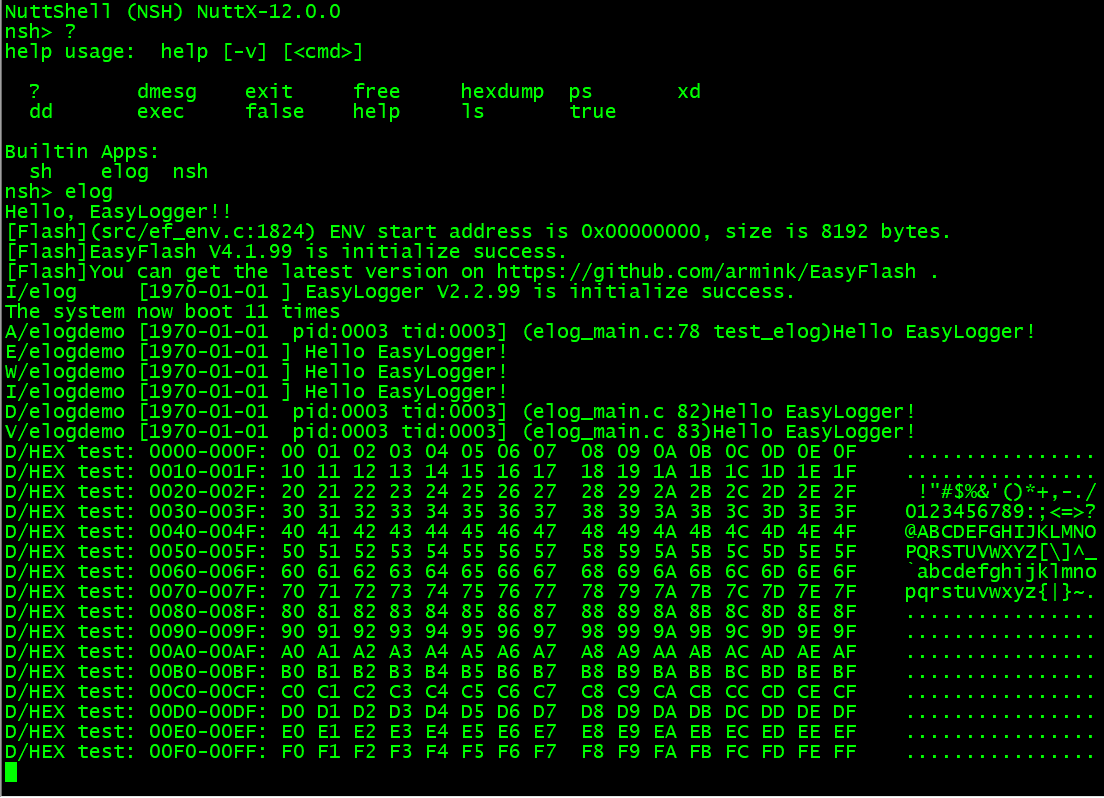
编译和下载完成后,在nsh控制台输入`elog`回车启动脚本并观察输出结果。
|
|
|
|
|
|
|
|
|
|
|
|
## 3、文件(夹)说明
|
|
|
|
|
|
|源文件(夹) |描述 |
|
|
|
|:------------------------------ |:----- |
|
|
|
|apps |nuttx-apps应用层目录|
|
|
|
|apps/examples/ |nuttx应用层示例代码目录|
|
|
|
|apps/examples/easylogger/elog_main.c |Easylogger和Easyflash的Example Demo代码|
|
|
|
|apps/system/ |nuttx应用层系统库目录|
|
|
|
|apps/system/easylogger/inc/elog_cfg.h |Easylogger配置文件|
|
|
|
|apps/system/easylogger/port/elog_port.c |Easylogger移植参考文件|
|
|
|
|apps/system/easyflash/inc/ef_cfg.h |Easyflash配置文件|
|
|
|
|apps/system/easyflash/port/ef_port.c |Easyflash移植参考文件|
|
|
|
|
|
|
## 4、其他说明
|
|
|
|
|
|
### 4.1、移植说明
|
|
|
|
|
|
1、把根目录`EasyLogger/`里的以下这些文件拷贝到指定位置;
|
|
|
```
|
|
|
cd EasyLogger/
|
|
|
cp easylogger/inc/elog.h demo/os/nuttx-spiflash/apps/system/easylogger/inc
|
|
|
cp easylogger/plugins/flash/elog_flash.* demo/os/nuttx-spiflash/apps/system/easylogger/plugins/flash/
|
|
|
cp -R easylogger/src/ demo/os/nuttx-spiflash/apps/system/easylogger/
|
|
|
```
|
|
|
|
|
|
2、拷贝apps下所有目录覆盖到nuttx的apps目录下。
|
|
|
|
|
|
3、nuttx目录中清除并更新apps目录结构缓存。
|
|
|
```
|
|
|
make apps_distclean
|
|
|
make menuconfig
|
|
|
```
|
|
|
|
|
|
4、`make menuconfig`选择以下配置,打开Easylogger Demo Example:
|
|
|
```
|
|
|
CONFIG_EXAMPLES_EASYLOGGER=y
|
|
|
```
|
|
|
将自动打开配置
|
|
|
```
|
|
|
CONFIG_MTD_W25=y
|
|
|
```
|
|
|
|
|
|
5、添加mtd ioctl的指令ID:(如果关闭Easyflash功能可以省略)
|
|
|
- 打开`nuttx/include/nuttx/mtd/mtd.h`文件,并添加:
|
|
|
```C
|
|
|
#define MTDIOC_GETMTDDEV _MTDIOC(0x000c)
|
|
|
```
|
|
|
|
|
|
6、暴露w25的mtd设备节点:(如果关闭Easyflash功能可以省略)
|
|
|
- 打开`nuttx/drivers/mtd/w25.c`文件
|
|
|
- 添加变量声明:
|
|
|
```C
|
|
|
static FAR struct mtd_dev_s *mtd_w25;
|
|
|
```
|
|
|
- 找到`w25_ioctl`函数,在`switch (cmd)`里面添加:
|
|
|
```C
|
|
|
case MTDIOC_GETMTDDEV:{
|
|
|
FAR struct mtd_dev_s **mtd =
|
|
|
(FAR struct mtd_dev_s *)((uintptr_t)arg);
|
|
|
DEBUGASSERT(*mtd != NULL);
|
|
|
*mtd = mtd_w25;
|
|
|
ret = OK;
|
|
|
}break;
|
|
|
```
|
|
|
- 找到`w25_initialize`函数,在`ret = w25_readid(priv)`读ID正确返回的括号里添加:
|
|
|
```C
|
|
|
mtd_w25=&priv->mtd;
|
|
|
```
|
|
|
|
|
|
7、编译`make -j4`,下载到板子后,在NSH控制台输入`elog`,即可查看输出结果。
|